tripityo - trip planner

Project Overview
TRIPITYO is an all-in-one digital platform for trip planning. Users open it, start building an itinerary, and leave without finishing. This case study documents the full process of diagnosing why,and designing a solution that keeps them in the flow.
Problem
The form feels impossible to finish
Users start filling in Day 1 — two destinations in, they see how much is left. The form is too long, everything is shown at once, and there's no sense of progress. So they close the app.
Picking a package feels like a guessing game
Too many operators, too little clarity on what's actually included. Users open Google or TikTok to compare — and never come back. Once they leave the app, the chance of returning is very low.
Budget shock hits too late
The user plans their whole trip. They reach the last step and realize the total is way over budget. Starting over feels painful, so they just abandon the plan entirely.
Solution
The form is broken into two levels: first pick a day (by actual date, not just "Day 1"), then work through morning, afternoon, and evening time blocks. Inside each block, you start by just adding a place — then optionally expand time, notes, and cost chips on the card. No overwhelming pre-filled fields.
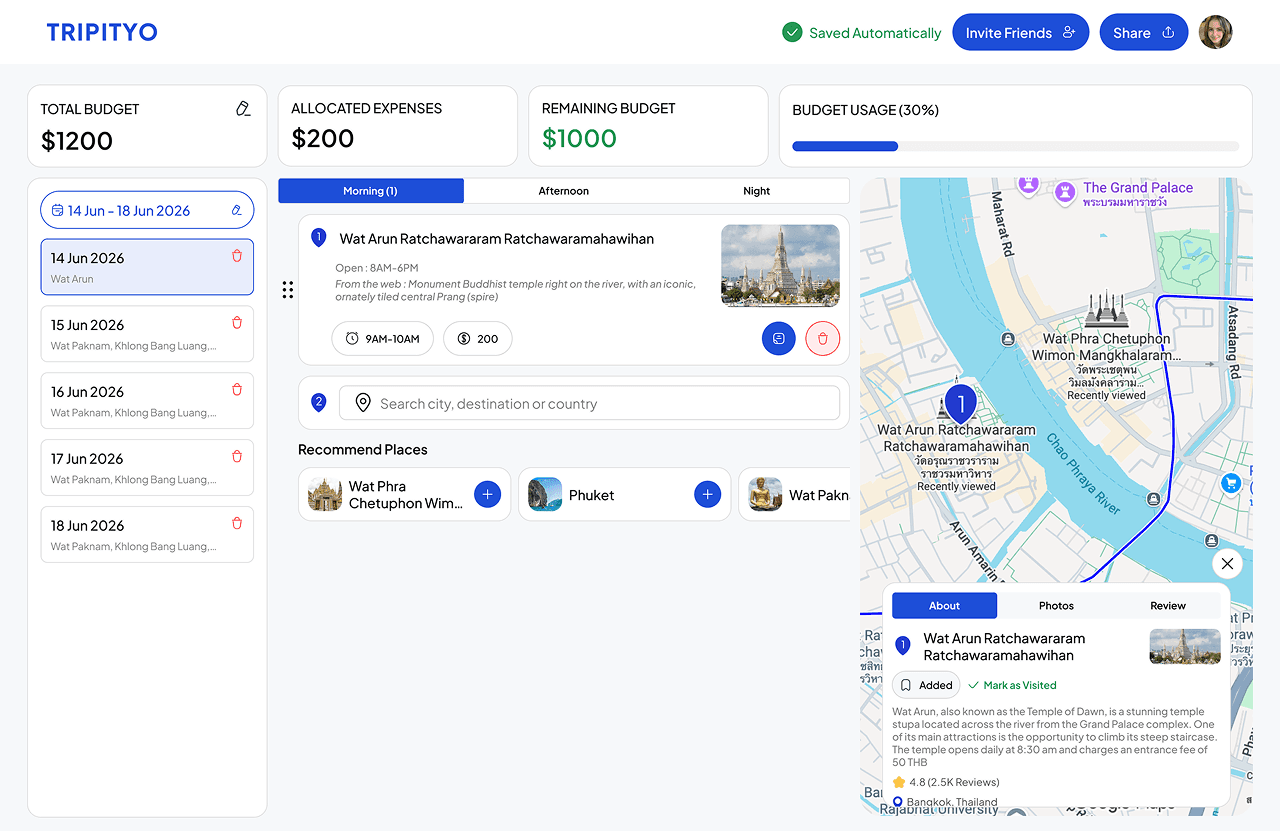
Users enter their total trip budget first, then add a cost to each activity as they plan. A sticky bar at the top shows total, spent, and remaining — at all times, not just at the end. Manual entry for now (real-time API sync is too complex for v1).
Pick up to 3 packages and compare them side-by-side in a table. Price, rating, duration, accommodation, transport, meals, guide — all in one view. The best values are called out clearly. A sticky bar at the bottom shows selected packages and triggers the comparison.
Homepage
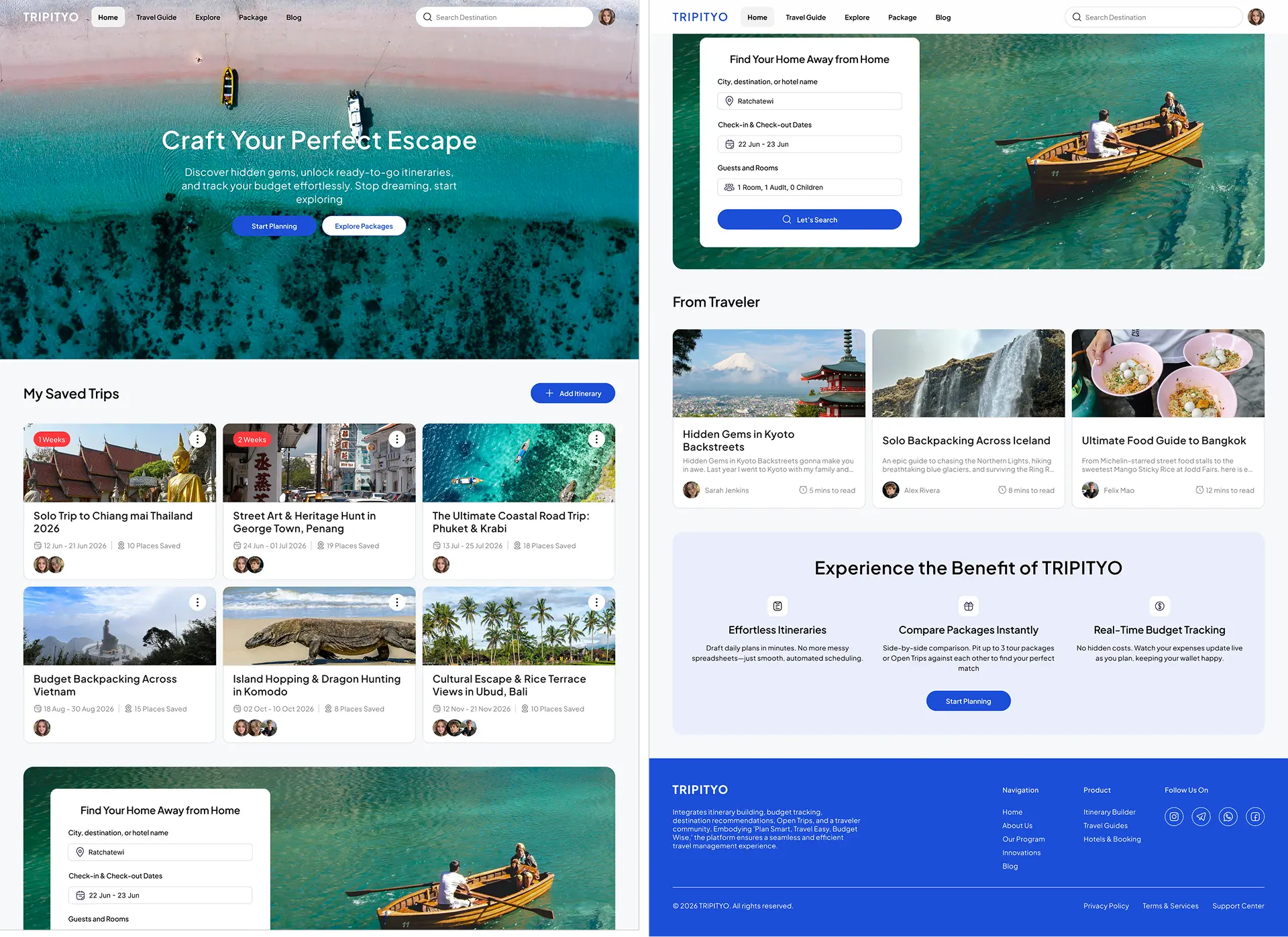
The hero banner sets the tone — it's not just a dashboard, it feels like the beginning of a trip. Below the hero, users can see their saved trips in a grid of cards, each showing the destination, dates, and how many places they've added. Scrolling further shows hotel search, travel blog posts from other users, and a quick summary of what TRIPITYO offers
Modal Add Itinerary
When a user clicks "+ Add Itinerary," a modal slides over the homepage requiring two mandatory inputs: destination and dates. The destination field features a search box with popular chips (e.g., Thailand, Nusa Penida, Tokyo) to assist undecided users, while the date field sits directly below. Both fields are required to establish the itinerary's day structure.

Itinerary Form & Set Budget
Prior to scheduling activities, a streamlined modal prompts the user to enter their total trip budget as a single value. This high-level figure serves as the anchor for the sticky budget bar at the top, from which subsequent activity costs are deducted in real-time. Designed to minimize friction before the planning process begins, the modal is light, straightforward, and easily dismissible.

The itinerary interface dynamically tracks progress in real time. The persistent budget bar displays the total budget, allocated funds, remaining balance, and a utilization progress bar. The left column highlights the active day and its scheduled stops, while the center column organizes activities into time-of-day tabs. Individual activity cards showcase the location name, operational hours, description, interactive chips for time and cost, and an optional personal notes field. Simultaneously, the live map on the right plots the locations with connecting routes, complemented by a details panel for ratings, reviews, and status actions.
Compare & Book a Package
This side-by-side table compares selected packages across columns, detailing price, duration, ratings, and activities against a left-aligned attribute column. It features alternating row backgrounds for scannability, a "+" button to add more packages, and an "Add To Itinerary" button to seamlessly import preferred choices into the trip planner.


